How to Unlock Apple Watch Without Passcode | Full Guide
Locked out of your Apple Watch? We detail proven methods: unpairing via your iPhone, a manual reset on the watch itself, and using iCloud's Find My. We also explain what to do with the iCloud Activation Lock for full access.


Forgetting the passcode to your Apple Watch can instantly lock you out of your health data, notifications, and daily convenience. You're not alone in searching for a way to unlock your Apple Watch without the passcode. The good news is that Apple provides official methods to regain access, though they require erasing the device. This guide walks you through each proven solution, from the simplest to the most technical, and clarifies the crucial role of the iCloud Activation Lock in the process.
Important First Step: Understanding Activation Lock
Before you begin, it's critical to understand Activation Lock. This is a security feature that links your Apple Watch to your Apple ID and iCloud account. It remains active even after you erase the watch's data. After following any unlock method below, if the watch was previously protected by "Find My," it will ask for the original owner's Apple ID and password to activate. There is no legitimate software that can bypass this iCloud Activation Lock without the original credentials. Bypassing it requires the previous owner to remove the device from their account or Apple's verification with proof of purchase.
💡Tip: Is Your Paired iPhone Also Locked?
Many users find themselves in a “double lock” situation. If you've also forgotten your iPhone's passcode and cannot access it, the standard unpairing method below will not work. Your first step should be to regain access to your iPhone. We cover a smart solution for this specific scenario later in this guide.
Method 1. Unpair and Erase Using Your Paired iPhone (Easiest Method)
This is Apple's recommended and most straightforward method if you have access to the iPhone your watch is paired with. Unpairing automatically backs up your watch's data to the iPhone and then erases the watch, including the forgotten passcode.
Step 1. Keep your Apple Watch and iPhone close together, and then open the Apple Watch app on your iPhone.
Step 2. Go to the "My Watch" tab and tap on "All Watches”.
Step 3. Tap the info button (ⓘ) next to the watch you want to unlock.
Step 4. Tap "Unpair Apple Watch".If you have a cellular model, choose to keep or remove your cellular plan.

Step 5. You will be prompted to enter your Apple ID password to disable Activation Lock. If you don't know this password, you can still proceed, but Activation Lock will remain on the watch.
Step 6. Confirm the unpairing. Your iPhone will create a backup and then erase your Apple Watch completely.
Step 7. Once erased, you can set up the watch again. If Activation Lock is off, you can pair it as new. If it's still on, you'll need the original Apple ID and password.
Method 2. Erase Directly on the Apple Watch (No iPhone Needed)
If you don't have your paired iPhone nearby, you can perform a factory reset directly on the Apple Watch itself. This is useful if your iPhone is lost, broken, or you've purchased a second-hand watch.
Step 1. Place your Apple Watch on its charger to ensure it doesn't power off during the process.
Step 2. On your Apple Watch and go to Settings, tap “General”> “Reset”.
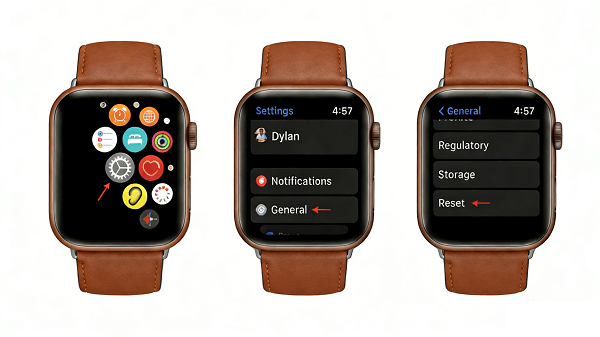
Step 3. A new option, "Erase all content and settings", will appear. Tap on it.
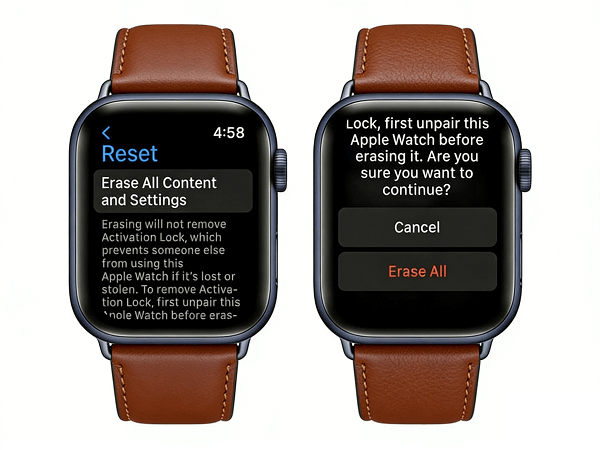
Step 4. Tap "Erase All" to confirm. This will wipe the watch, including the passcode.
Step 5. The watch will restart. You can now attempt to pair it with a new iPhone. Remember, the iCloud Activation Lock will still be present if it wasn't turned off before the erase.
Method 3. Use iCloud's Find My (For Lost or Remotely Managed Watches)
If "Find My" was enabled on the watch, you can use the iCloud website to erase it remotely. This is ideal if the watch is lost or you can't physically access either of the devices above.
Step 1. On a computer, go to icloud.com/find and sign in with the Apple ID linked to the locked watch.
Step 2. Click "All Devices" at the top and select your Apple Watch from the list.
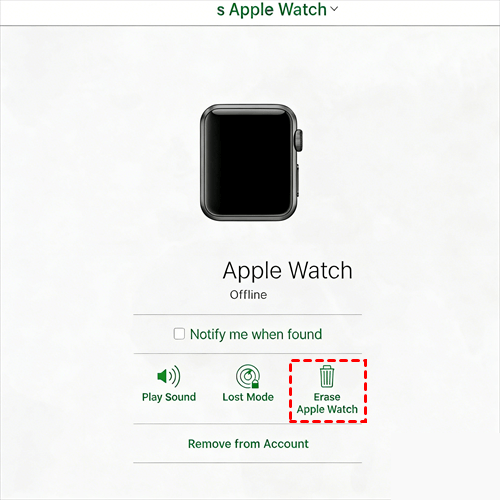
Step 3. Click "Erase Apple Watch". This will remotely wipe all its content and settings.
Step 4. After the erase is complete, you have the option to click "Remove from Account". This is the critical step to remove the Activation Lock. If you do this, the watch will no longer be linked to your Apple ID.
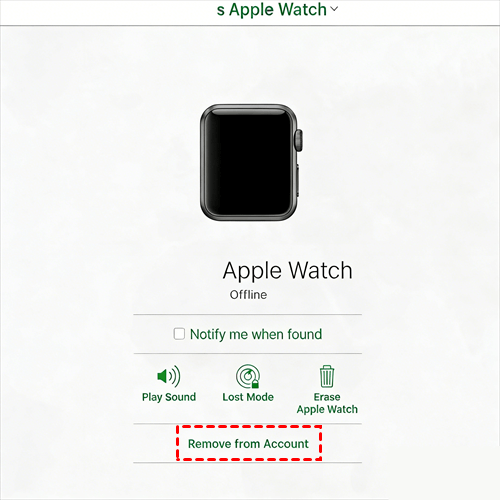
Step 5. You can now pair the erased watch to a new iPhone without being blocked by Activation Lock.
Your iPhone: The Key to Unlocking Your Apple Watch
This is a crucial point to understand: the process of unlocking your Apple Watch often hinges on its paired iPhone. Many users face a double-lock dilemma: a forgotten watch passcode and an inaccessible iPhone that manages it. When you can't access the Watch app on your iPhone, the most convenient unlock method (unpairing) is blocked.
This is precisely where FoneTool Unlocker provides a critical solution. It is specifically designed to address this root cause: removing the iPhone's screen passcode or Apple ID lock. By first regaining control of your iPhone, you can smoothly open the Watch app and use the "Unpair" function to erase the watch's passcode. In essence, it unlocks the door to resetting your watch by fixing the "command center."
- ★Why This is a Smarter Path to a Solution:
-
Targets the Core Problem: Addresses the most common blocker to managing your watch - a locked iPhone.
Potential for Data Preservation: Under specific conditions (e.g., if Find My is disabled), it may remove an Apple ID without erasing iPhone data, helping you retain important information.
Clear and Simple Process: Transforms a complex system-level issue into clear, guided on-screen steps.
If your Apple Watch issue stems from an inaccessible paired iPhone, regaining control of the iPhone is your most effective first step. Learn more about how to unlock iPhone without passcode.
Frequently Asked Questions on Apple Watch Unlock
In the End
All in all, unlocking a forgotten Apple Watch password requires erasing the device. Unpairing it from your paired iPhone is the best first step, as it creates a backup. If that's not possible, you can perform a factory reset directly on the watch or a remote erase via iCloud.com.
Always remember that the iCloud Activation Lock is a separate, crucial security layer that requires the original Apple ID credentials to fully remove. While tools like FoneTool Unlocker do not work on the Apple Watch itself, they can be invaluable for resolving related iPhone lock issues that may prevent you from managing your watch.
FoneTool Unlocker - 1-Click iPhone Unlock Software
Easily unlock all passcodes and restrictions on your iPhone, iPad, and iPod Touch.
-
 iOS 27 Compatible
 iPhone 17 Supported
100% Secure

Kelsey is an English editor at FoneTool, passionate about helping users solve tech issues. She specializes in iPhone data management, backup, and recovery. In her free time, she enjoys learning IT skills and spending time with loved ones.
Read author info >>



 as a preferred
source on Google
as a preferred
source on Google