How to change language in FoneTool Unlocker?
FoneTool Unlocker supports multiple languages, including English, German (Deutsch), French (Français), Japanese (日本語), Italian (Italiano), Spanish (Español), French, Dutch, Polish, Simplified Chinese and Traditional Chinese (繁體中文). If you want to set it to your native language, please see the instructions below.
You can click "Menu" (three-lines on the upper right side of the main window) and choose "Language" you want to use and click "OK" to save the changes. After that, you will see that the language has been changed.

Note: You could add custom language in FoneTool Unlocker. To do this, please first copy the language file (for example kr.txt) to the installation directory of FoneTool Unlocker-->lang (the default path is "C:\Program Files (x86)\FoneTool Unlocker\lang"). Right-click on langList.xml and choose Edit, start a new line and enter the text below:
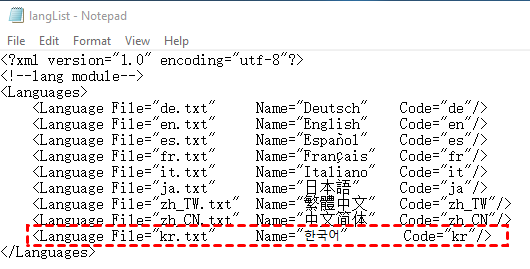
Save the changes and run FoneTool Unlocker, you will see the new added language is listed in "Language Settings".
FoneTool Unlocker Can Do More for You

- Manage Phone Data In One Place
with FoneTool - iPhone Transfer
- iPhone Backup
- iPhone Data Recovery
- Erase iPhone Data
- HEIC Converter
- Photo Deduplication
- WhatsApp Backup and Transfer
- FoneTool Unlocker is Compatible with All iOS
and iDevices - iOS 27/26/18/17/16/15/14/13/12/11 and former
- iPadOS 27/26/18/17/16/15/14/13/12/11 and former
- iPhone 17 (Air)/17 Pro (Max)
- iPhone 16 (Plus)/16 Pro (Max)
- iPhone 15 (Plus)/15 Pro (Max)
- iPhone 14/14 Pro (Max), 13/13 mini/Pro (Max)
- iPhone 12/12 mini/Pro (Max), iPhone 11/11 Pro (Max)
- iPhone X/XR/XS/XS Max, iPhone 8/8 Plus,
- iPhone 7/7 Plus, iPhone 6/6s/6s Plus
- iPhone SE (1st, 2nd, 3rd generations)
- iPod touch 1/2/3/4/5/6/7
- All models of iPad Air, iPad mini, iPad Pro and iPad