Downgrade iOS Software: 5 Safe Methods (iOS 26 Supported)
This article provides 5 best downgrade iOS software to help you downgrade iPhone operating system. Don't let unwanted iOS updates ruin your device experience.


Seek Downgrade iOS Software
Can I downgrade my iPhone from iOS 26 to iOS 18? I bought a new iPhone and upgraded to iOS 26. My experience after the update was terrible, and I want to downgrade to iOS 18, but there is no Apple-signed firmware available. Is there any free, safe, and reliable software to downgrade the iOS version?
- Question from Apple Community
Is It Possible to downgrade iOS?
Yes, iOS downgrading is increasingly common as users seek compatibility and stability. Many iPhone and iPad users prefer previous iOS versions over latest updates. While the process of downgrading iOS to previous versions involves complexity, reliable software solutions enable version rollbacks even without Apple's firmware signing.

This guide presents 5 carefully selected tools for downgrading iOS to older versions, with detailed information to inform your decision.
5 Best Downgrade iOS Software Free Download
If you are not used to the latest iOS version, in this section, we have listed 5 best apps for you to downgrade the iOS version.
Option 1. Tinyumbrella
TinyUmbrella, also known as The Firmware Umbrella, is a free Windows application that can be used to downgrade iPhone operating system. Its main function is to enter or exit recovery mode on iOS devices. In addition, you can also use it to force the installation of software updates to downgrade your iPhone.
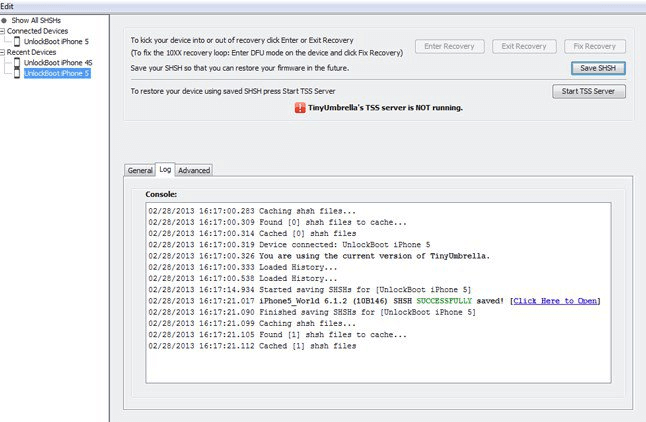
 Pros:
Pros:
- Completely free iOS downgrade tool
- Broad iPhone and iPad compatibility
Cons:
- Limited recent maintenance updates
- May not support latest iOS models
Option 2. FoneTool Repair - All-in-One iOS Repair and Downgrade Tool
FoneTool Repair is a professional and user-friendly tooloffering safe downgrades from iOS 26 to older versions like iOS 18, even without Apple signatures.
✨Key Features:
- One-click downgrade with high success rate
- Complete data protection during process
- Intuitive interface requiring no technical skills
- Full iOS version and device compatibility
Pros:
- Data-safe downgrading
- User-friendly operation
- Comprehensive device support
Cons:
- May feel unresponsive at times
How to Downgrade iOS with FoneTool Repair:
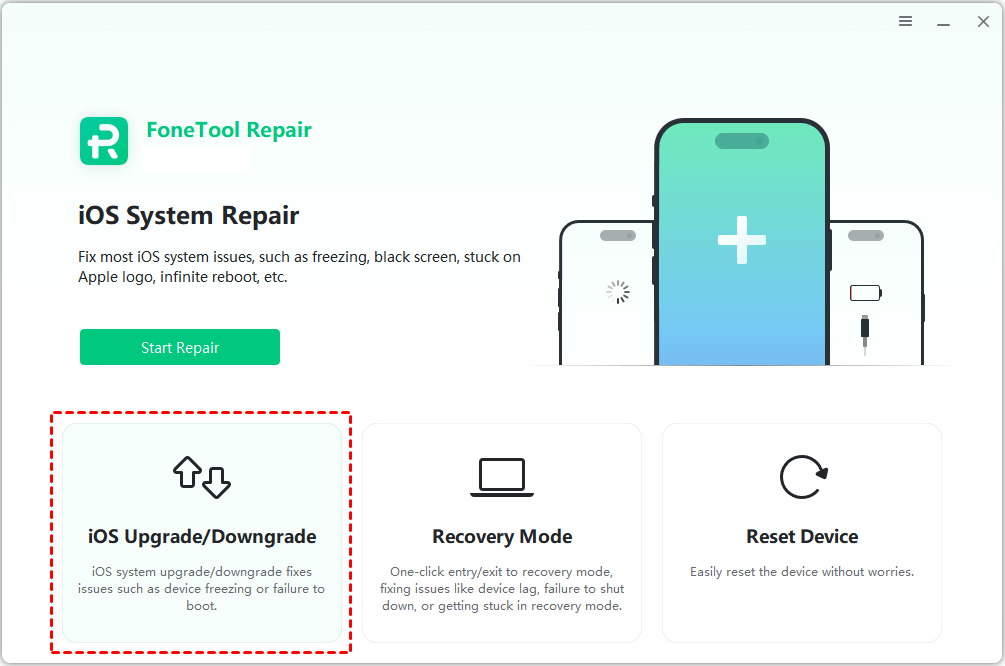
Step 1. Install and launch FoneTool Repair > Select iOS Upgrade/Downgrade.
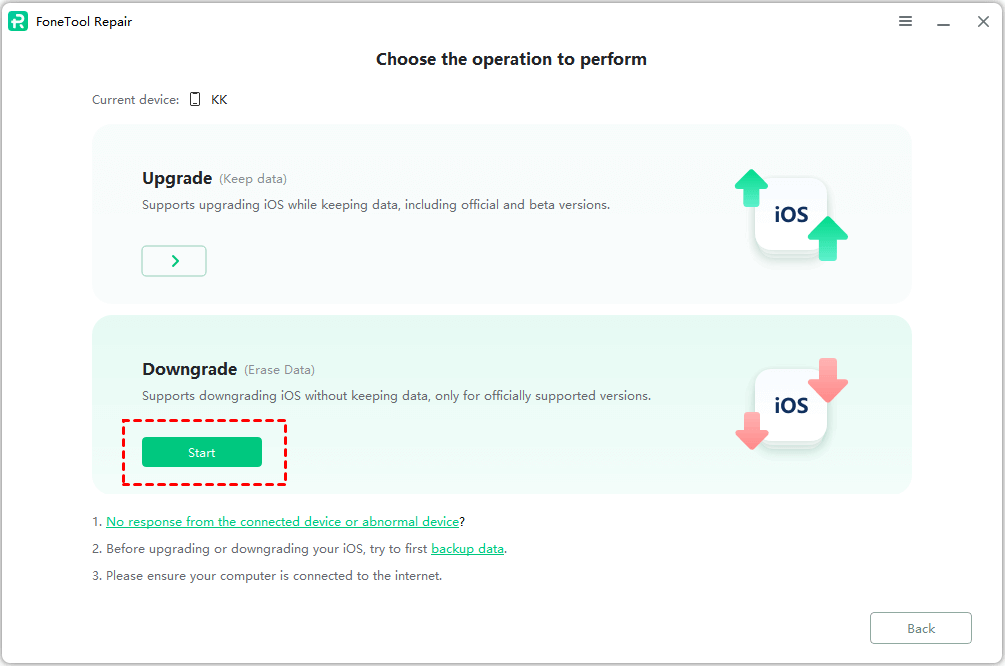
Step 2. Choose the Downgrade option.
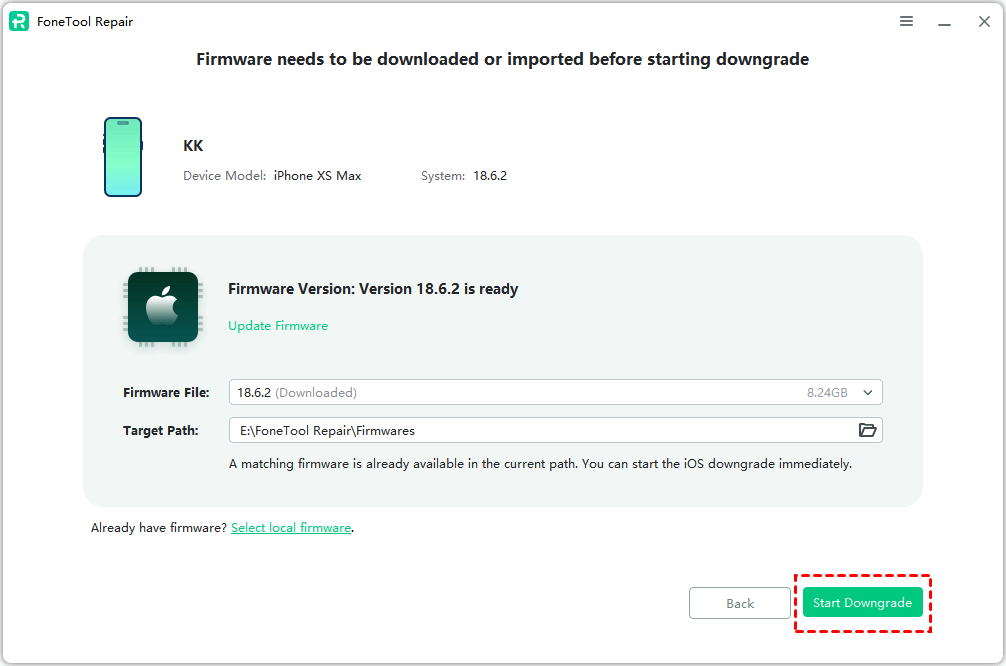
Step 3. Download recommended firmware > Start Downgrade to get iOS 26 back to iOS 18.
Tip: Backup your iPhone before downgrading using FoneTool's comprehensive backup features. Go to the next part (Bonus Tip) to easily backup iPhon with FoneTool!Option 3. Futurerestore
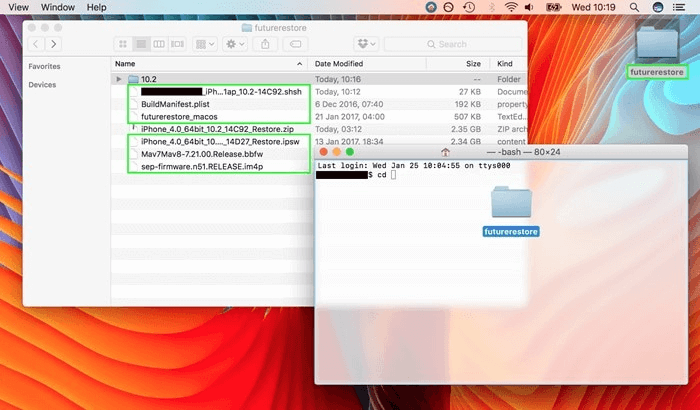
Futurerestore is a free software to downgrade iOS for jailbroken users. Even if Apple has stopped signing a certain iOS version, Futurerestore can help you restore your iPhone to that version. You can restore your device to any iOS version, even a beta version.
Pros:
- SEP+ baseband customization for firmware restoration
- Cross-platform downgrade methods
- Completely free service
Cons:
- Limited iOS version compatibility
- Requires technical expertise
- Potential device issues from improper operation
Option 4. TaigOne Downgrader
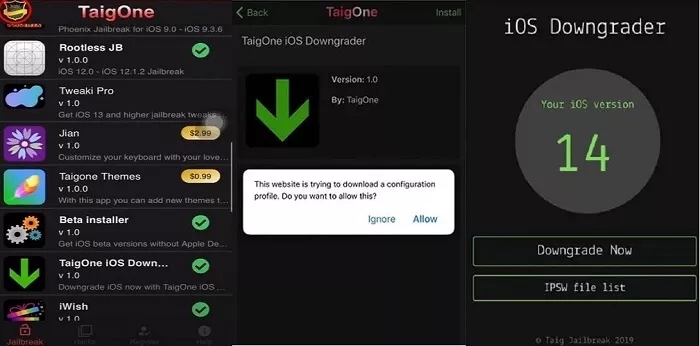
TaigOne Downgrader is a software specially designed for iOS downgrading, which is easy to operate and suitable for general users without professional skills. Compared with other tools, it provides an intuitive user interface and clear step-by-step guide, allowing users to quickly downgrade to an iOS version that still has Apple's signature.
TaigOne Downgrader also integrates jailbreak functionality, allowing users to jailbreak their device after downgrading to unlock more customization options.
Pros:
- Free to use
- User-friendly interface
- Automatic firmware downloading
- Integrated jailbreak functionality
Cons:
- Jailbroken device requirement
- Occasional process failures
- Limited device compatibility
Option 5. Joyoshare UltFix
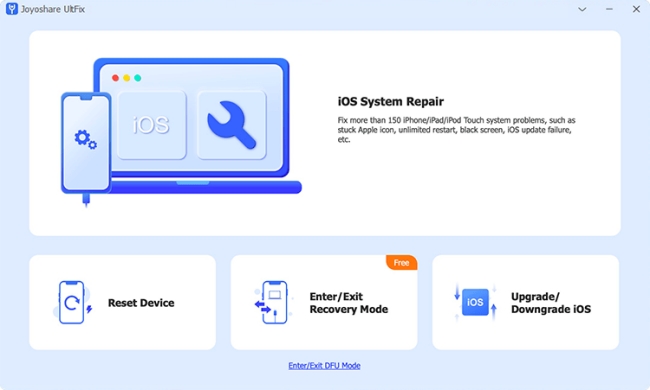
Joyoshare UltFix is a popular downgrade tool that features over 150 iOS system-related fixes. Not only can it downgrade devices from iOS 26 to iOS 18, but it can also be used on earlier versions of devices. Not just iPhones, other devices can also be downgraded by using Joyoshare.
Pros:
- Simple interface
- Multiple iOS repair functions
- Broad device compatibility
Cons:
-
Paid software requirement
Bonus Tip: Backup iPhone before Downgrading iOS
In order to avoid unexpected data loss when you downgrade iOS software, it is essential to back up your iPhone data in advance. Compared with iTunes and iCloud, we recommend a faster and simpler iOS free backup tool - FoneTool. It not only helps you downgrade iOS, but also can help you manage your iPhone data easily!
Best iOS Backup Tool for Free - FoneTool
- ▶ Complete or selective iPhone data backup
- ▶ Superfast backup speed and easy-to-use
- ▶ Stable and offline backup process
- ▶ Restore iPhone data without Apple ID limitation
- ▶Compatible with the newest iOS model and the latest iOS
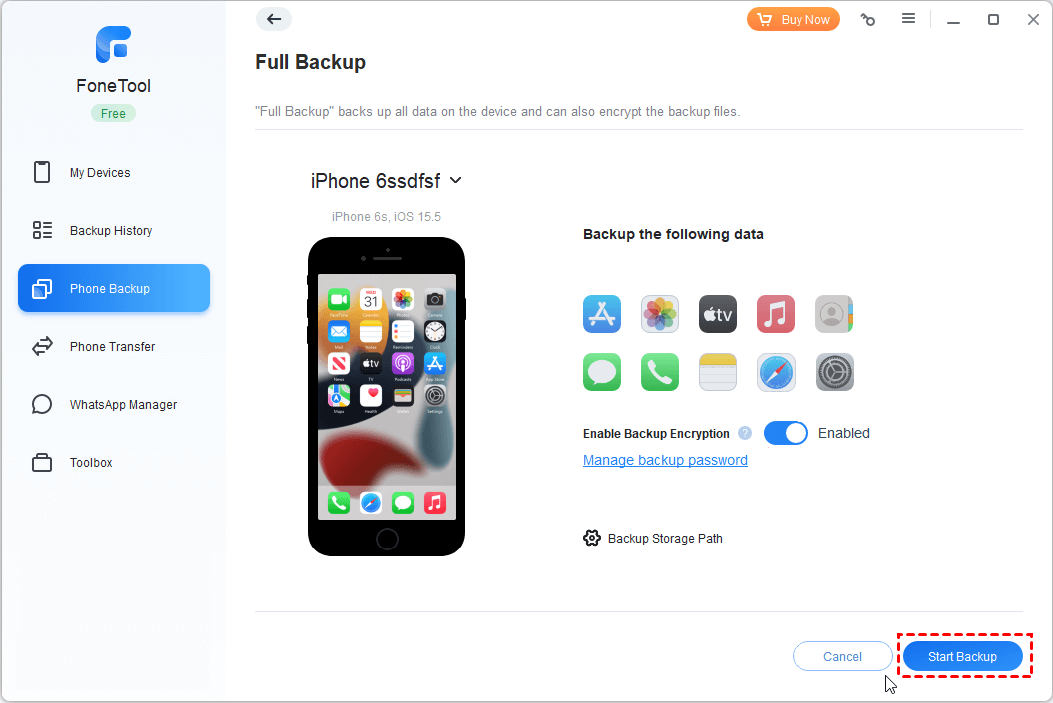
Step 1. Open FoneTool on your PC > Connect iPhone > Trust device.
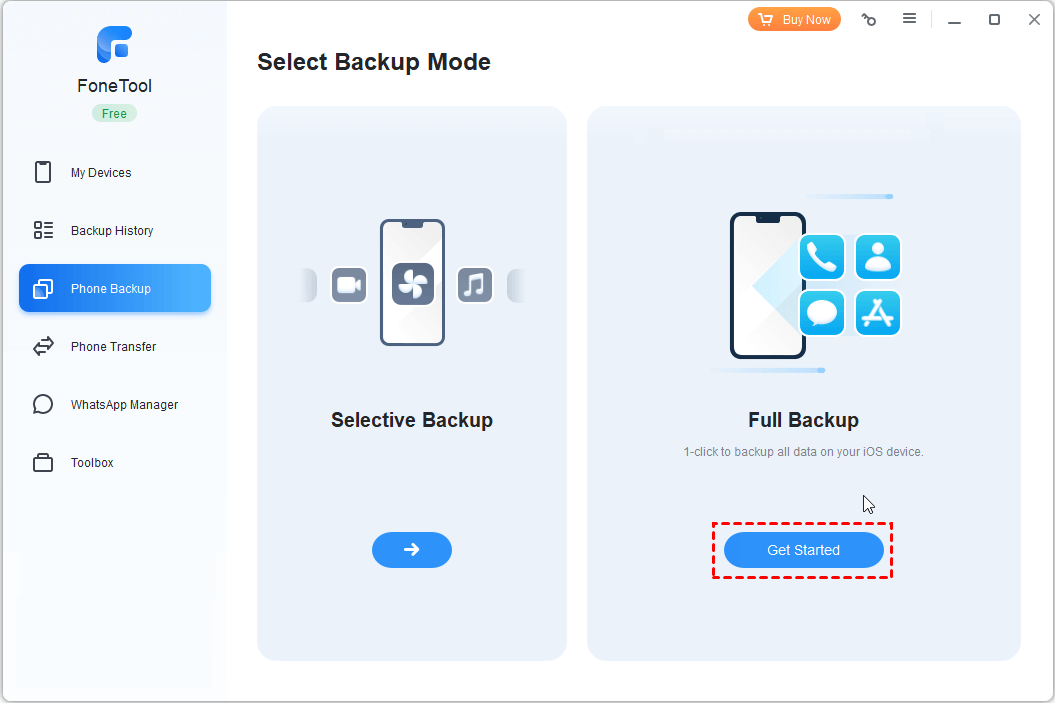
Step 2. Click Phone Backup > Choose Full Backup > Tap on Get Started.
Step 3. Enable Backup Encryption if needed > Set storage path > Tap Start Backup.
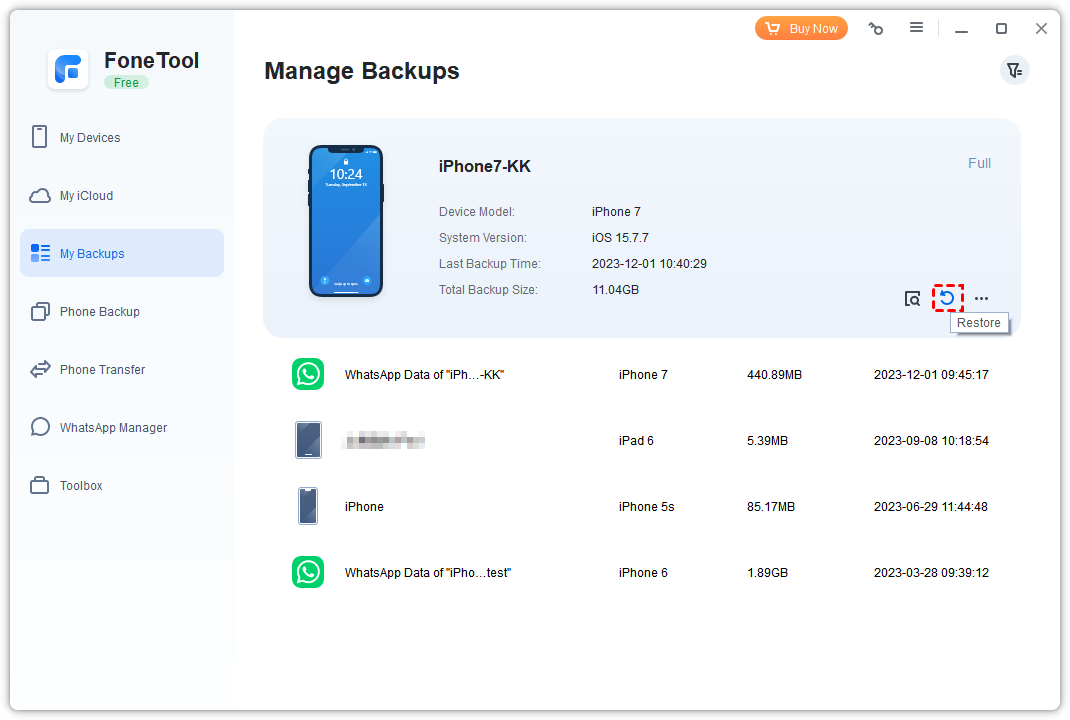
Step 4.Go to My Backups and click Restore to get your backup to target devices (iPhone/iPad/iPod).
💡Additional Feature: By the way, FoneTool also supports transferring data from iPhone to iPhone without iCloud. With a few simple clicks, you can move all iPhone data to your new iPhone, including apps, documents, WhatsApp data, photos, videos, music, messages, etc.
Conclusion
These 5 iOS downgrade solutions each serve different user needs: TinyUmbrella offers free basic functionality, Futurerestore provides jailbreak flexibility, while TaigOne and Joyoshare cater to specific user scenarios. For maximum safety, ease of use, and efficiency, FoneTool Repair stands out with its one-click, data-safe downgrade process supporting latest iOS 26 and all iPhone models. Resolve problematic updates quickly with FoneTool Repair's smooth version switching capabilities.
Fixes 160+ iOS/iPadOS issues, boot loops, crashes, failed updates, with no data loss.
-
 iOS 27 Compatible
 iPhone 17 Supported
100% Secure

Kelsey is an English editor at FoneTool, passionate about helping users solve tech issues. She specializes in iPhone data management, backup, and recovery. In her free time, she enjoys learning IT skills and spending time with loved ones.
Read author info >>



 as a preferred
source on Google
as a preferred
source on Google