Top 7 Dr.Fone Alternatives for iOS Unlocking in 2026
FoneTool Unlocker is the best Dr.Fone alternative in 2026. Remove screen passcode, Apple ID, and bypass activation lock. Affordable iOS unlocking -simple steps.


Dr.Fone has long been known as a comprehensive mobile toolkit, but its steep subscription fees, occasional performance issues, and mixed user reviews have led many to search for a Dr.Fone alternative that is both affordable and effective. This article reviews the best options available, with detailed comparisons and step-by-step guidance.
Why Look for a Dr.Fone Alternative?
Many users are not satisfied with Dr.Fone for several reasons. Its monthly subscription plans start at $39.95 for iOS and 49.95 for $Android, which can quickly become expensive. Performance issues have also been widely reported: the software has not been updated since August 2024, making it incompatible with newer iOS versions. Some users have experienced privilege escalation vulnerabilities, and others have criticized poor data recovery results and misleading billing practices.
Beyond cost and technical concerns, many people simply need a solution that is easier to use and covers only the features they actually need—without paying for an entire toolkit full of unnecessary modules. That is where dedicated iOS unlocking tools come in.
The Best Dr.Fone Alternative-FoneTool Unlocker
When evaluating iOS unlocking tools, FoneTool Unlocker consistently stands out as the most practical and affordable Dr.Fone alternative. It is a professional iOS unlocking software that removes screen passcodes, Apple IDs, Screen Time restrictions, and iTunes backup encryption—quickly and without requiring technical expertise.
- ★Key Features:
- Remove all types of screen locks (4-digit/6-digit passcodes, Touch ID, Face ID, custom alphanumeric codes)
- Delete Apple ID without the password (including iCloud activation lock bypass)
- Unlock Screen Time passcode without erasing data
- Remove iTunes backup encryption to regain backup access
- Compatible with all iOS versions and all iPhone models up to the latest
Follow these simple steps to unlock your iOS device:
Step 1. Download and launch FoneTool Unlocker on your PC. Connect your iPhone, iPad, or iPod Touch using a USB cable.
Step 2. On the main interface, select the appropriate unlock option based on your situation: screen passcode removal, bypass iCloud Activation lock, Apple ID removal, Screen Time unlock, or iTunes backup decryption.

Step 3. Follow the on-screen instructions to put your device into Recovery Mode or DFU Mode if prompted. The software provides clear, model-specific guidance.
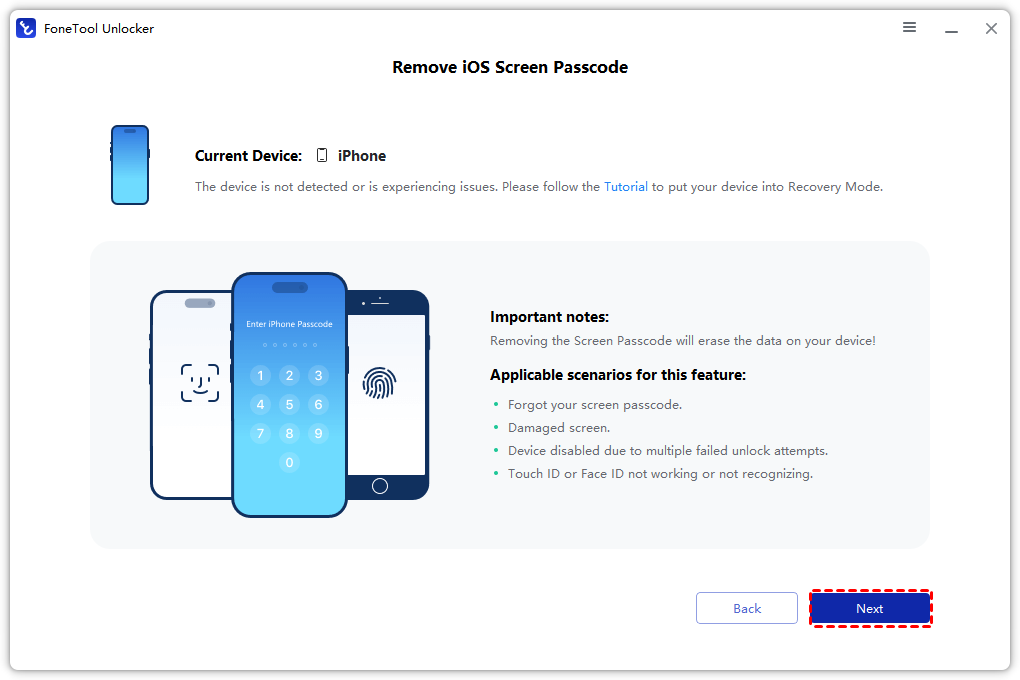
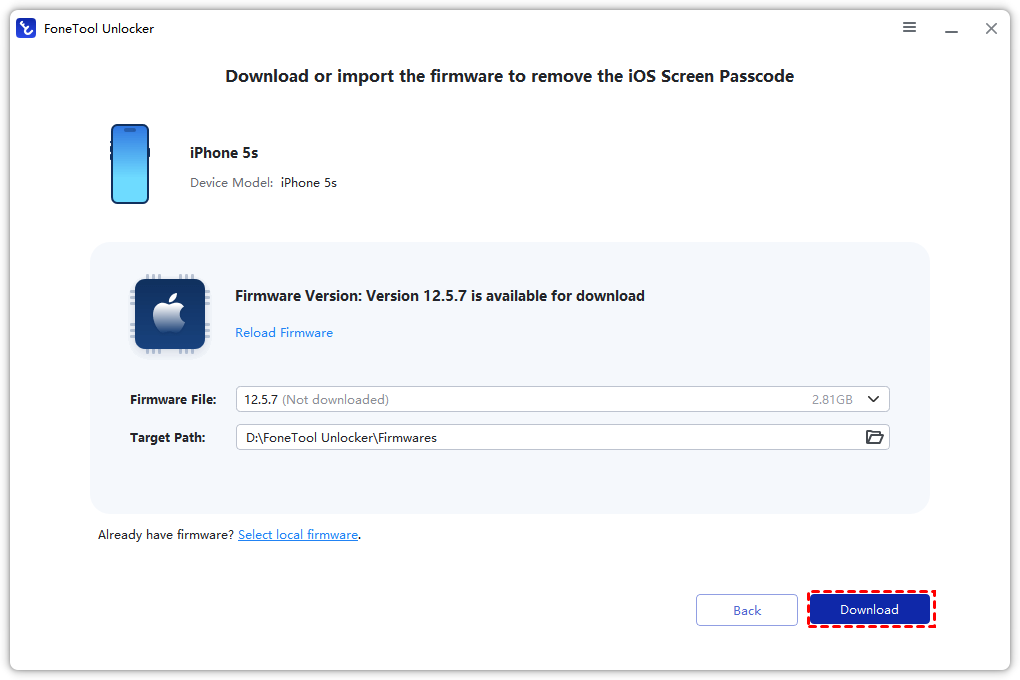
Step 4. The software will automatically detect your device model and download the necessary firmware. Ensure your internet connection is stable.
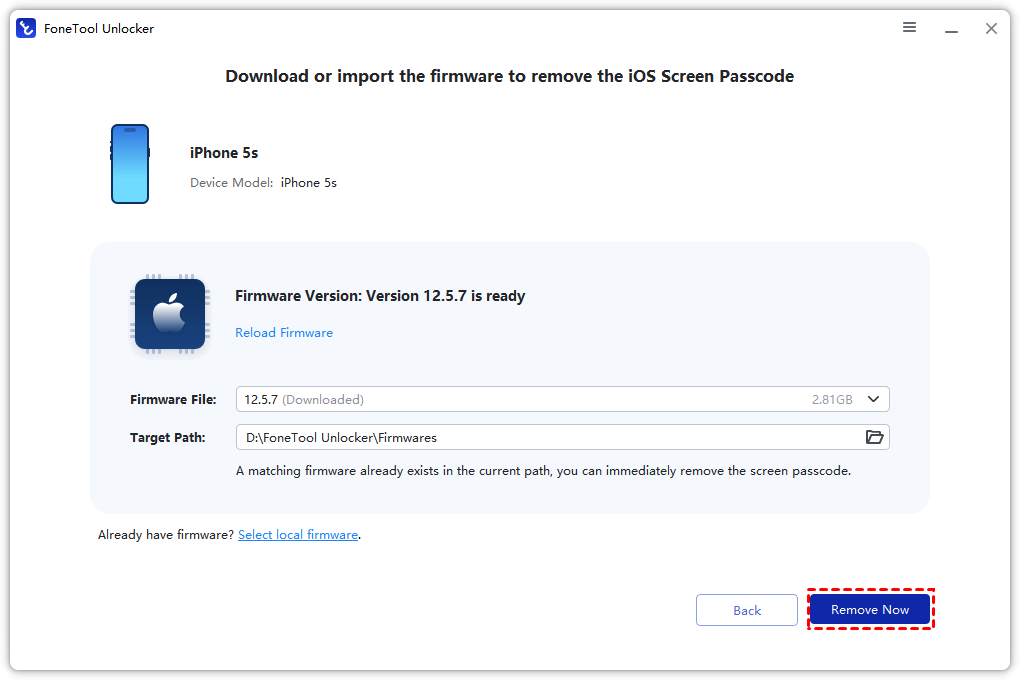
Step 5. Click the “Remove Now” button and wait for the process to complete. Once finished, your device will restart and you can set it up as new.
6 Other Notable Dr.Fone Alternatives
While FoneTool Unlocker is our top recommendation, it’s always wise to compare your options. Below are six other reliable tools that can also serve as a solid Dr.Fone alternative depending on your budget and specific needs.
1. Tenorshare 4uKey
4uKey is a well-known iOS unlocking tool that can remove various screen locks. However, many users find its pricing relatively high, and unlocking a device may erase all data. It also receives mixed feedback about refund policies.
2. iMyFone LockWiper
LockWiper offers an intuitive interface and supports removing multiple lock types, including screen passcodes and Apple IDs. It performs well on most modern devices but may feel slower on older iPad models. Note that some users report data loss during the unlocking process.
3. iToolab UnlockGo
UnlockGo can bypass iPhone screen locks, remove Apple IDs, and delete Screen Time passcodes. It supports iOS 11.4 and above. However, its features are limited by iOS version, and the free trial cannot unlock anything.
4. EaseUS MobiSaver
EaseUS is primarily a data recovery tool, but it serves as a solid Dr.Fone alternative for users focused on recovering lost files from iOS devices. Its free version has limited functionality, and it lacks dedicated unlocking modules.
5. PhoneRescue
PhoneRescue specializes in data recovery for both iOS and Android devices. It is a good alternative if your primary need is retrieving deleted photos, messages, or contacts, rather than unlocking your device.
6. PassFab iPhone Unlocker
PassFab offers a straightforward interface for removing various iOS locks at a competitive price point. It is a reliable choice for users on a budget, though its feature set is more limited compared to FoneTool Unlocker.
Comparison Table: Dr.Fone Alternatives
| Feature | FoneTool Unlocker | Tenorshare 4uKey | MyFone LockWiper | iToolab UnlockGo |
|---|---|---|---|---|
| Screen Passcode Removal | ✅ | ✅ | ✅ | ✅ |
| Apple ID Removal | ✅ | ✅ | ✅ | ✅ |
| Screen Time Unlock | ✅ | ❌ | ✅ | ✅ |
| iTunes Backup Decryption | ✅ | ❌ | ❌ | ❌ |
| Data Backup Support | ✅ | ⚠️ (recommended) | ⚠️ (recommended) | ⚠️ (recommended) |
| Pricing | More affordable | Higher | Moderate | Moderate |
FAQs
Conclusion
If you are looking for a trustworthy Dr.Fone alternative that won’t drain your wallet or force you to learn complicated steps, FoneTool Unlocker is the answer. It handles screen passcode removal, Apple ID deletion, Screen Time bypass, and iTunes backup decryption quickly and safely - all without jailbreaking or recurring subscription fees. While tools like Tenorshare 4uKey and iMyFone LockWiper have their strengths, none match the overall value, simplicity, and feature set of FoneTool Unlocker. Ready to unlock your iOS device? Download FoneTool Unlocker now and take full control in minutes.
FoneTool Unlocker - 1-Click iPhone Unlock Software
Easily unlock all passcodes and restrictions on your iPhone, iPad, and iPod Touch.
-
 iOS 27 Compatible
 iPhone 17 Supported
100% Secure

Kelsey is an English editor at FoneTool, passionate about helping users solve tech issues. She specializes in iPhone data management, backup, and recovery. In her free time, she enjoys learning IT skills and spending time with loved ones.
Read author info >>



 as a preferred
source on Google
as a preferred
source on Google