Top 3 iMyFone LockWiper Alternative | A Complete Comparison
Searching for the best imyfone lockwiper alternative? This complete comparison covers features, pricing, user feedback, and FoneTool Unlocker review.


Why People Are Searching for an iMyFone LockWiper Alternative?
iMyFone LockWiper is a well‑known iOS unlocking tool. It can remove screen passcodes, Apple ID locks, Screen Time passcodes, and MDM restrictions. However, several common pain points drive users to seek the best alternative to iMyFone LockWiper:
- Unlocking failures on newer iOS versions
- Slow firmware download speeds
- Limited free features
- Subscription renewal confusion
- Compatibility problems on Windows PCs
- Inability to remove Apple ID in certain situations
For users who simply need a fast and reliable way to unlock an iPhone that won't turn on properly, reliability is often more important than fancy features. This is why many people compare various unlocking tools before making a purchase.
What Makes a Good iPhone Unlock Tool?
A good iPhone unlocker for Windows or Mac should do more than just remove a passcode. Here are the key things users usually care about:
| Feature | Why It Matters | ||
|---|---|---|---|
| High unlock success rate | Reduces risk of failed unlocking | ||
| Supports latest iOS | Important for newer devices | ||
| Simple interface | Easier for beginners | ||
| Fast firmware download | Saves time | ||
| Stable connection | Prevents errors during unlocking | ||
| Apple ID removal support | Helpful for second-hand devices | ||
| Transparent pricing | Avoids unexpected renewals | ||
Top 3 iMyFone LockWiper Alternatives on the Market
After hands-on testing and analyzing user feedback, here are the top three alternatives worth considering.
1. FoneTool Unlocker – Best Overall Alternative
FoneTool Unlocker is a professional iOS unlocking tool designed to help you regain access to your iPhone, iPad, or iPod Touch without complex technical knowledge. Developed by FoneTool, a brand with over 17 years of experience and more than 10 million satisfied users, this tool offers comprehensive unlocking capabilities with an intuitive interface.
- ★Key Features:
- Remove 4-digit and 6-digit passcodes, unlock Face ID and Touch ID devices
- Bypass iPhone passcode on disabled devices
- All-in-one iOS unlocker for iCloud Activation lock, Apple ID, password management, etc
- Supports recent iOS versions and all iOS devices
- Clean interface with fewer crashes reported
📌How to Unlock an iPhone with FoneTool Unlocker
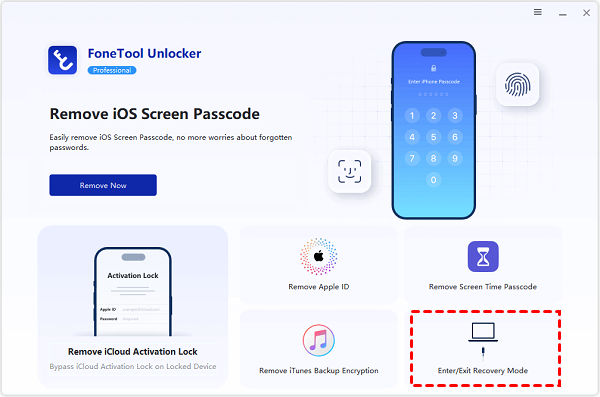
Step 1. Download and install FoneTool Unlocker on your PC, launch the program, and select Remove iOS Screen Passcode.

Step 2. Connect your iPhone using a USB cable, and go to Enter/Exit Recovery Mode to put the device into Recovery Mode if required.
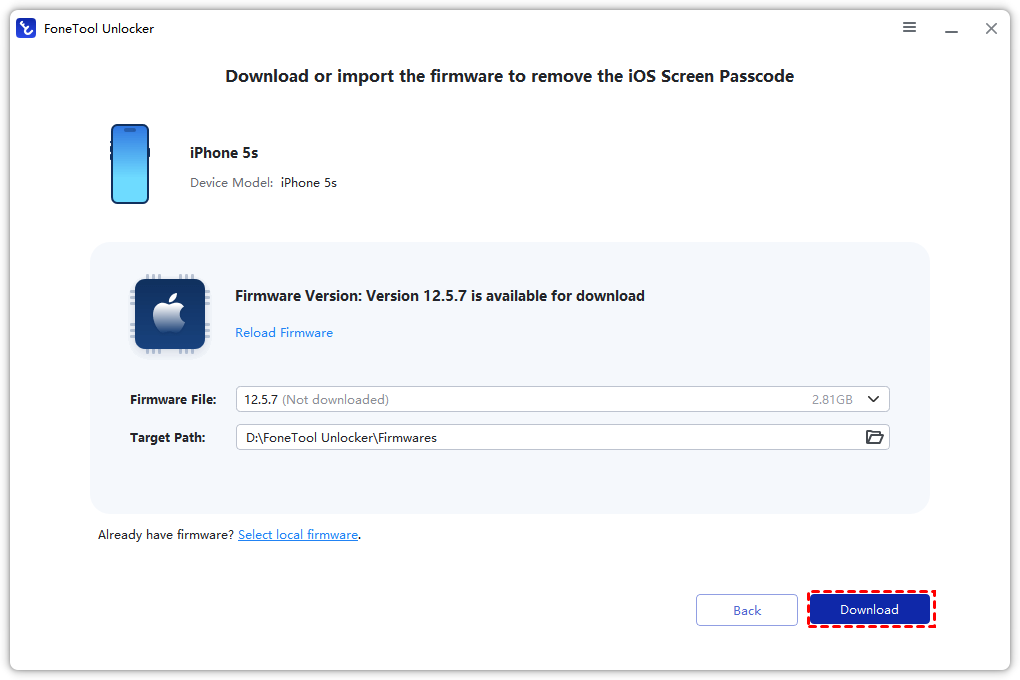
Step 3. Click the Download button to get the matching firmware package.
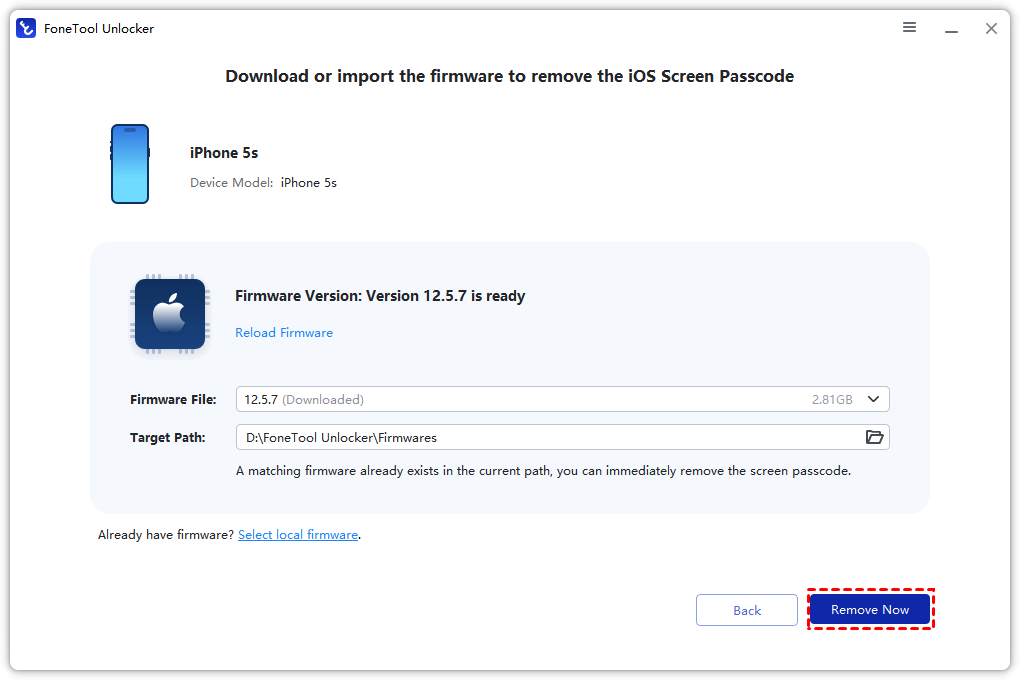
Step 4. Click Remove Now and wait for the process to finish.
😃Pros:
- Easy for beginners
- Stable unlocking process
- Supports multiple lock types
- Good for Windows users
- Faster workflow compared to many competitors
😣Cons:
- Some advanced features may require payment
- Mac version support may vary
2. Tenorshare 4uKey - A Reliable Contender
Tenorshare 4uKey is another well‑established iPhone unlocker. It can remove screen locks, bypass iCloud Activation Lock, remove MDM restrictions, and delete Screen Time passcodes. Some users find it slightly faster than LockWiper. However, its pricing is comparable to LockWiper's, and the free version is similarly restrictive. Many users specifically search for an "iMyFone LockWiper alternative" because they find 4uKey's interface less beginner‑friendly.
Key Features:
- Screen lock removal
- Apple ID removal
- MDM bypass
- Screen Time passcode removal
😃Pros:
- Multiple unlocking modes
- Widely known brand
- Supports many iOS devices
😣Cons:
- Interface can feel crowded
- Some users report slower firmware downloads
3. Dr.Fone-Screen Unlock (iOS) - The All-in-One Toolkit
Wondershare Dr.Fone is a comprehensive mobile toolkit that includes a screen unlock module. It supports removing all types of screen locks on both iOS and Android devices. The main advantage is that you get multiple tools in one package. However, the full Dr.Fone suite is expensive (upwards of $200), and the unlock feature alone isn't available separately. If you only need unlocking, a dedicated tool like FoneTool Unlocker is a better fit.
😃Pros:
- Large feature library
- Supports Android and iPhone
- Trusted by many long-term users
😣Cons:
- More expensive than competitors
- Heavier software installation
Frequently Asked Questions
Final Thoughts
Locked out of your iPhone is a stressful situation, but you don't need to overpay for a tool that may not even deliver. After comparing the top options, FoneTool Unlocker clearly stands out as the best imyfone lockwiper alternative. It removes screen passcodes, Apple IDs, Screen Time locks, and iTunes backups, all from a clean, beginner‑friendly interface. Whether you're dealing with a forgotten passcode, a second‑hand device with an unknown Apple ID, or a Screen Time restriction you can't bypass, FoneTool Unlocker has you covered.
FoneTool Unlocker - 1-Click iPhone Unlock Software
Easily unlock all passcodes and restrictions on your iPhone, iPad, and iPod Touch.
-
 iOS 27 Compatible
 iPhone 17 Supported
100% Secure

Kelsey is an English editor at FoneTool, passionate about helping users solve tech issues. She specializes in iPhone data management, backup, and recovery. In her free time, she enjoys learning IT skills and spending time with loved ones.
Read author info >>



 as a preferred
source on Google
as a preferred
source on Google