How to Remove Activation Lock without Apple ID for Free
You can remove Activation Lock for free by asking the previous owner to unlink the device, using your Apple Account or device passcode, or submitting proof of purchase to Apple. DNS tricks are only temporary on some old devices.


What Is iCloud Activation Lock?
Activation Lock is Apple’s server-side anti-theft protection for iPhone, iPad, Apple Watch, and other supported devices. When Find My is enabled, the device remains linked to the owner’s Apple Account even after it is erased. During setup, Apple may require the linked Apple Account and password or an accepted device passcode before the device can be activated again.
A factory reset does not remove Activation Lock. If a used device still asks for the previous owner’s account, the safest solution is to have that owner remove it from Find My or to use Apple’s ownership-verification process.
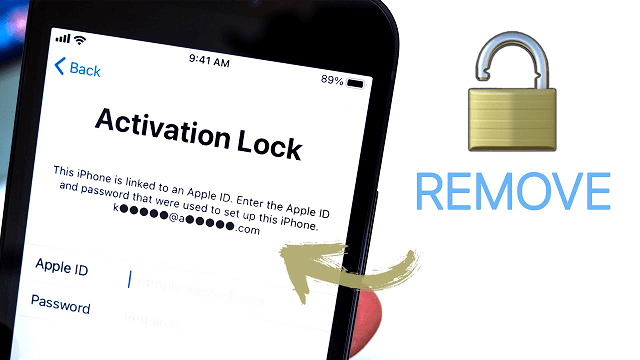
How to Remove Activation Lock Without an Apple ID: Free Options First
Start with Apple’s official options. They are free and preserve normal device functions. Use a third-party bypass only on a device you own or are authorized to manage, and only after checking model, iOS version, and feature limitations.
Quick Comparison – Which Method Fits Your Situation
| Method | Cost | Needs Previous Owner | Needs Proof of Purchase | Cellular Calls Work | Device Support |
|---|---|---|---|---|---|
| Previous owner remote removal | Free | Yes | No | Yes | All devices |
| Apple Support unlock | Free | No | Yes | Yes | All devices |
| FoneTool Unlocker | Paid | No | No | No after bypass | Almost all |
| DNS bypass | Free | No | No | No | iOS 10 and below (very low success) |
Way 1. Bypass Activation Lock via DNS (For Older iOS Only)
How to remove activation lock on iPad/iPhone without Apple ID and password? If your device is still running an older version of the operating system, you can try to bypass the Activation Lock using the DNS method.
This method exploits a vulnerability in the device's Wi-Fi DNS settings to trick the iPhone into thinking it has been unlocked, thereby bypassing the lock. Follow the guide to learn how to unlock iCloud Activation Lock by using DNS:
Step 1. Restart your iDevice and choose your language and country.
Step 2. Reach the Activate iPhone screen and navigate to Wi-Fi settings page.
Step 3. Connect to a network and click on the i icon near the network’s name.
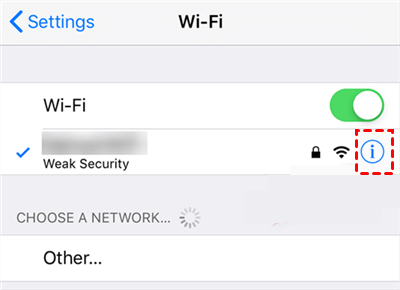
Step 4. Tap on the Configure DNS option on the screen > And then select the Manual option.
Step 5. Then enter one of the following DNS values based on your location:
- USA/North America - 104.154.51.7
- Europe - 104.155.28.90
- Asia - 104.155.220.58
- Rest of the world - 78.109.17.60
Step 6. Save the changes and return to the activation screen to check if you have unlocked the device.
 Note:
Note:
Way 2. Connect Apple Support to Unlock iPhone Locked without Apple ID
If you legally purchased the device but can't contact the previous owner to unlock it, you can contact Apple Support for help. Apple may be able to help you remove Activation Lock if you provide proof of purchase.

Here is a list of documents you'll need:
- Proof of purchase: Apple needs a receipt or document to prove you're the legal owner of the device.
- Device information: Apple needs your device's IMEI or serial number to find it in its database.
- Proof of identity: Apple may require personally identifiable information, such as proof of identity.
Once Apple verifies your ownership, they may be able to unlock the device.
Way 3. Remove Activation Lock without Apple ID via Third-party Tools
When the methods above aren't viable—perhaps you lack the receipt, the device is on a newer iOS, or you need a full, permanent unlock—third-party unlocking software offers a direct solution. Among these, FoneTool Unlocker is a reputable tool that includes a dedicated Remove iCloud Activation Lock feature. It's designed to completely bypass the lock screen, allowing you to activate and use the device normally with a new Apple ID.
What can FoneTool Unlocker do?► Remove Apple ID/Activation lock: FoneTool Unlocker can help you securely bypass Activation Lock or Apple ID.
► Unlock iTunes Backup Encryption: If you forget your iTunes backup password, it can help you bypass the password.
► Remove Screen Time Restriction: This excellent tool can remove the screen time restrictions with ease.
► Unlock Screen Passcode: FoneTool Unlocker can unlock the screen passcode when you forget the passcode.
How to use FoneTool Unlocker to remove iCloud Activation Lock:
Step 1. Download and launch FoneTool Unlocker > Connect your iOS device to your computer using a USB cable.
Step 2. Move to the "Remove iCloud Activation Lock" option on the interface.
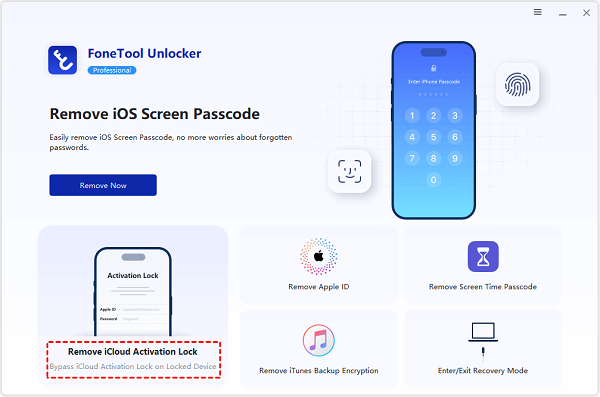
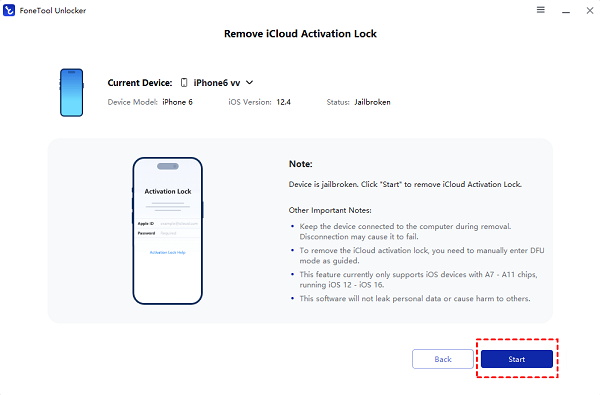
Step 3. Follow the instructions to safely jailbreak your device, and then click "Start" to bypass Activation without passcode.
Way 4. DNS Bypass – Only for Very Old Devices (iOS 10 and Below)
The DNS method keeps appearing in search results because it’s free and doesn’t require a computer. In real‑world testing, it’s mostly useless today.
Why it’s not worth your time:
- Success rate is around 30% – only on iOS 8–10 devices, and even then it’s hit or miss
- After bypass, you don’t get the normal home screen – just a limited browser with a few web links
- No phone calls, no Apple ID login, no App Store, no iCloud services
- The bypass disappears as soon as you lock the screen or reboot
- Using a third‑party DNS server also raises privacy concerns (they can see your web activity)
If you still have an iPhone 4s through the original iPhone SE (2016) running iOS 8–10, you can try it as a temporary emergency workaround. For any modern iPhone or newer iOS version, don’t waste your time.
For detailed steps (if you really want to try), see other dedicated DNS bypass guides. For most people, this method is dead.
Does DNS Bypass Still Work on Activation Lock?
DNS bypass does not remove Activation Lock from Apple’s servers. At most, some third-party DNS services may expose limited web functions on certain very old iOS versions. Calls, messages, iCloud sign-in, and normal activation remain unavailable, and routing traffic through an unknown DNS provider creates privacy and reliability risks.
For current iPhones and iPads, use the previous-owner, account-recovery, or Apple support paths instead. The former list of third-party DNS server addresses has been removed because it was unverified, duplicated the article’s advice, and could give readers a false impression of a permanent unlock.
FAQs on Unlocking iCloud Activation Lock
More Solutions for iPhone/iPad Lock
If you’re dealing with an iPad specifically, or you need more detail on similar locks, check out these articles. Each covers a slightly different angle – iPad‑focused steps, what to do when you can’t reach the owner, and even AirPods Apple ID removal.
- How to Remove Activation Lock on iPad: 4 Useful Ways – iPad‑specific methods
- How to Unlock iCloud Locked iPad – focused on iCloud lock bypass
- How to Unlock iPad Locked to Owner – solving the “iPad locked to owner” error
- Activate iPad Without Apple ID and Password Free – activating iPad without credentials
- Remove Activation Lock Without Previous Owner – when the previous owner is gone
- How to Remove Apple ID from AirPods Without Previous Owner – similar lock logic for AirPods
Conclusion
That’s all about how to remove activation lock without Apple ID for free. Free methods like the DNS bypass are limited and temporary, while Apple Support requires solid documentation.
For a reliable and permanent solution that you can execute yourself, a professional tool like FoneTool Unlocker provides an effective path forward with its dedicated Remove iCloud Activation Lock function. It's a practical choice for regaining full use of your iPhone or iPad when other doors are closed.
FoneTool Unlocker - 1-Click iPhone Unlock Software
Easily unlock all passcodes and restrictions on your iPhone, iPad, and iPod Touch.
-
 iOS 27 Compatible
 iPhone 17 Supported
100% Secure

Kelsey is an English editor at FoneTool, passionate about helping users solve tech issues. She specializes in iPhone data management, backup, and recovery. In her free time, she enjoys learning IT skills and spending time with loved ones.
Read author info >>



 as a preferred
source on Google
as a preferred
source on Google