How to Delete Screen Time History on iPhone - 3 Effective Methods
Locked out of your Screen Time history? This guide shows you how to erase it using built-in settings, specialized software like FoneTool Unlocker for forgotten passcodes, or a full factory reset.


To delete Screen Time history on your iPhone, you must disable the entire Screen Time feature, as there is no direct "clear history" option within settings. This guide explains the official and alternative methods to reset your usage data and regain privacy.
Before you begin, choose the method that best fits your situation. The table below provides a quick comparison to help you decide.
|
Method |
Best For |
Key Point |
|
Turn Off Screen Time |
Users who know their Screen Time passcode |
The official, most direct method; only deletes Screen Time data. |
|
FoneTool Unlocker |
Users who have forgotten their Screen Time passcode |
Removes the password lock, allowing you to disable the feature and clear history. |
|
Factory Reset iPhone |
Users seeking a complete, permanent wipe of all data |
Erases everything on the device. A full backup is essential beforehand. |
Method 1. Turn Off Screen Time (If You Know the Passcode)
This is the standard, in-built method. Disabling Screen Time stops tracking and deletes your accumulated history.
Step 1. Open the Settings app on your iPhone.
Step 2. Tap Screen Time.
Step 3. Scroll to the bottom and tap Turn Off Screen Time.
Step 4. You will be prompted to enter your 4-digit Screen Time passcode.
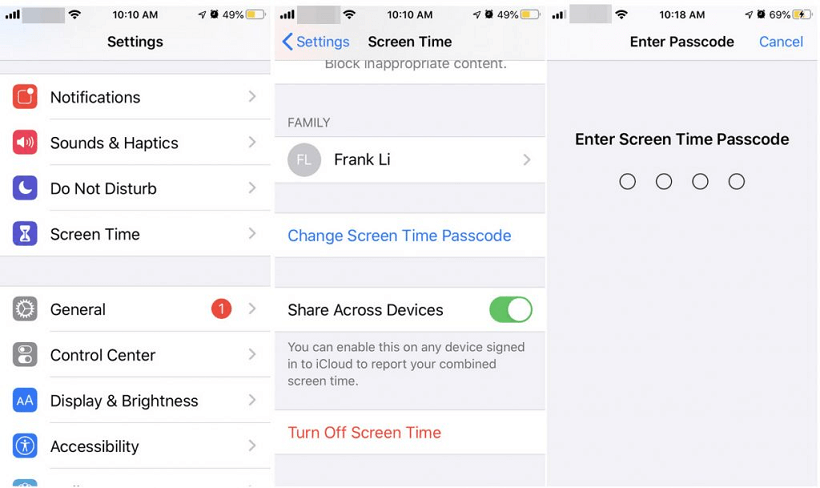
Step 5. Confirm the action. All your Screen Time history and reports will be deleted.
Step 6. If you re-enable Screen Time later, it will start collecting data anew from that point.
Method 2. Use FoneTool Unlocker (If You Forgot the Passcode)
Forgetting your Screen Time passcode locks you out of the settings. In this case, a professional tool like FoneTool Unlocker provides an effective solution. It bypasses the forgotten passcode, allowing you to remove the restriction and then disable Screen Time.
✅ Removes Screen Time & Screen Passcodes: Unlocks your iPhone when you forget the passcode.
✅ Bypasses Apple ID Locks: Helps regain access if a device is linked to an unknown Apple ID.
✅ High Success Rate: Offers a reliable and effective unlocking process.
✅ User-Friendly & Fast: Features simple steps for a quick resolution.
✅ Safe and Secure: Performs the unlock without compromising your device's system.
Step 1. Open FoneTool Unlocker on your computer and connect your iPhone using a USB cable.
Step 2. From the main menu, choose the “Remove Screen Time Passcode” function.
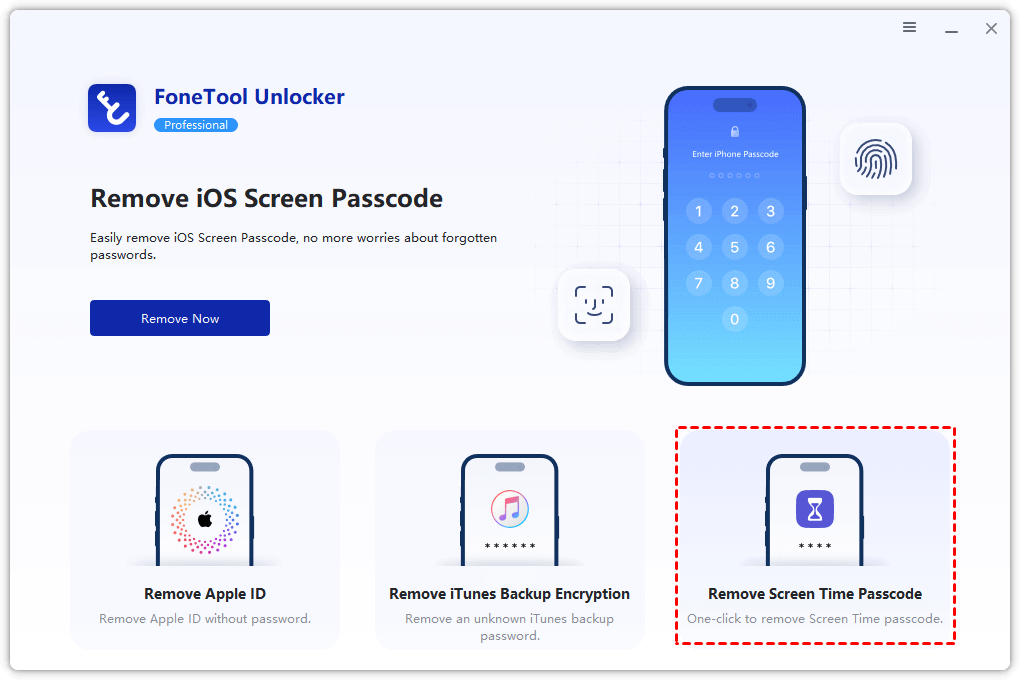
Step 3. The software will provide instructions to prepare your iPhone (disable the Find My iPhone feature).
- ★Tips:
- If you don’t know how to turn off Find My feature, please check the guide.
Step 4. Once ready, click “Remove Now” to remove the passcode. You can then disable Screen Time in Settings without needing the old code.

Method 3.Factory Reset Your iPhone
A factory reset will erase your iPhone completely, including all Screen Time data, apps, photos, and personal settings. Always ensure you have a recent backup before proceeding.
Step 1. Go to Settings > General > Transfer or Reset iPhone.
Step 2. Tap Erase All Content and Settings.
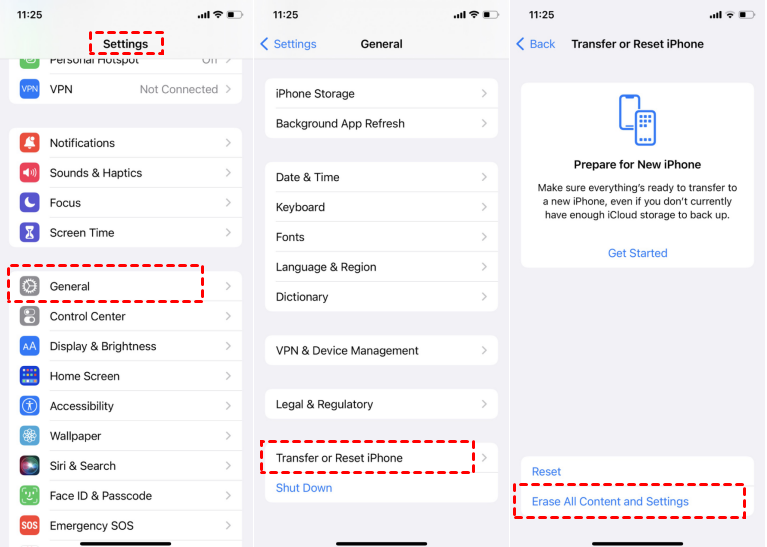
Step 3. If prompted, enter your device passcode and Apple ID password to confirm.
Step 4. Confirm the erase command. Your iPhone will restart as if it were brand new, with no Screen Time history.
- ★Tip:
- If you don't want to lose any iPhone data, you can use a professional iOS data manager like FoneTool to backup your iPhone and protect the important content on your device at all times.
Frequently Asked Questions (FAQ)
Conclusion
While iPhone doesn't offer a one-tap option to clear Screen Time history, you can effectively reset your data by disabling the feature. If you know your passcode, use the built-in settings. If you're locked out, a specialized tool like FoneTool Unlocker offers a reliable solution without data loss. For a completely fresh start, a factory reset is the most thorough option.
Ready to manage your digital footprint? Assess your situation and choose the method that gives you back control and privacy.
FoneTool Unlocker - 1-Click iPhone Unlock Software
Easily unlock all passcodes and restrictions on your iPhone, iPad, and iPod Touch.
-
 iOS 27 Compatible
 iPhone 17 Supported
100% Secure

Kelsey is an English editor at FoneTool, passionate about helping users solve tech issues. She specializes in iPhone data management, backup, and recovery. In her free time, she enjoys learning IT skills and spending time with loved ones.
Read author info >>



 as a preferred
source on Google
as a preferred
source on Google