Samsung Galaxy Tab E Bypass FRP After/Before Bypass FRP - Complete Guide
Samsung Galaxy Tab E bypass FRP made simple: learn what triggers the Google account lock on the Tab E, remove it with FoneTool Unlocker step by step, and stop it before your next factory reset.


The Galaxy Tab E - the 9.6-inch SM-T560/SM-T561 from 2015 and the 8.0-inch SM-T375/SM-T377 from 2016 - is a popular hand-me-down device, which is exactly why so many of them end up locked by someone else's account. If you are also troubled by how to let Samsung Galaxy Tab E bypass FRP, get into this Samsung Google account removal guide now.
Overview of Samsung Google Account Lock
Google Account Lock, also called Factory Reset Protection (FRP), usually appears on Galaxy devices on Android 5.1 and higher. FRP lock is enabled automatically once a Google account is registered on a device, and it stays active unless that account is removed before a factory data reset. Reset the tablet through the recovery menu or any route other than Settings > General management > Reset > Factory data reset, and the lock switches on.
This provides such devices with an anti-theft feature, ensuring that a stolen tablet cannot simply be wiped of its data and resold. However, a side effect is that legitimate owners may also find themselves locked out and need to bypass FRP on Samsung Galaxy Tab E - a situation that typically arises in one of the following 3 scenarios:
- You bought the Tab E second-hand and the previous owner reset it without removing their account.
- It's a family hand-me-down, and nobody remembers which Google account was on it.
- It's yours, you forgot the password, and a password reset triggered Google's 24–72 hour sync delay (enter the password wrongly and that timer restarts).
|
|
||
|
When it applies |
Already locked out at the verification screen |
Tablet works, and you can open Settings |
|
What it does |
Removes an active FRP lock |
Prevents FRP from ever activating |
|
Requires |
Windows PC, USB cable |
Your screen lock |
|
Data |
Already erased by the reset |
Erased by the reset you perform |
|
Best for |
Second-hand tablets, forgotten accounts |
Selling, trading in, or handing down a working tablet |
Best Way for Samsung Galaxy Tab E Bypass FRP - Using Professional Unlocking Software
FoneTool Unlocker is a Windows unlocking utility. It provides a dedicated Samsung FRP bypass for supported Galaxy phones and tablets, aimed at owners who are locked out and don't have the original Google credentials. What it does for Samsung Galaxy Tab E bypass FRP:
▶Qualcomm Snapdragon support - it covers Qualcomm (Snapdragon) chipsets, and the Snapdragon 410, found in the Tab E 8.0, is part of this series.
▶Version-specific methods - rather than one generic FRP bypass option, it offers dedicated bypass paths grouped by Android version, plus extra methods for US - market Samsung models (useful for carrier units like the SM-T377V)and MediaTek devices.
▶Android 6 to 16 coverage - dedicated methods for Android 16, 11/12/13, 6/9/10, and 7/8, so older tablets on Marshmallow or Nougat are handled as well as current ones.
▶One-click removal - a universal one-click FRP removal option for supported devices, so no command-line work is involved.
▶Simple to use - No ADB commands, no rooting, no APK sideloading; just run it on a Windows 11, 10, 8.1, 8, or 7 PC with a USB connection.
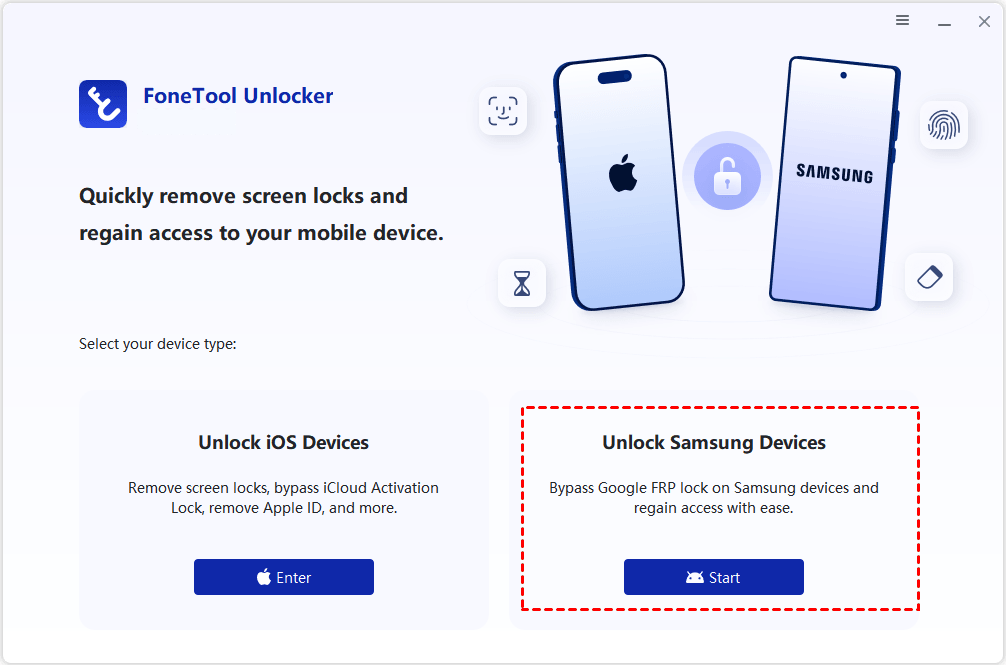
Step 1. Connect the locked Galaxy Tab E to the computer with a USB cable. Run FoneTool Unlocker on a Windows PC and launch it. Select Unlock Samsung Devices > Start.
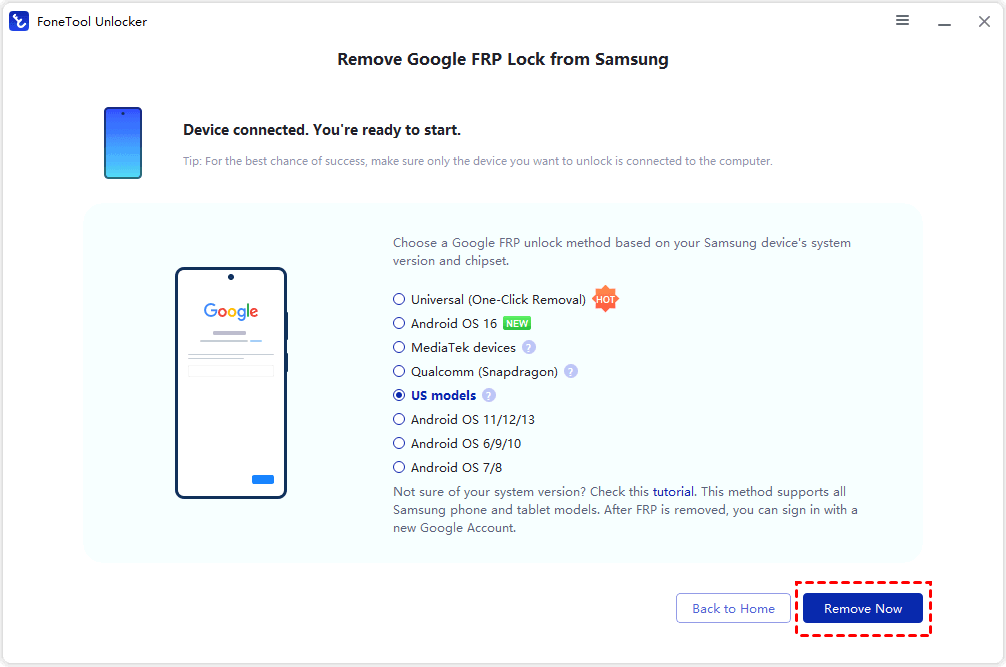
Step 2. Choose an FRP removal method. If you are not sure of the Android version, pick Universal (One-Click Removal), then click Remove Now.
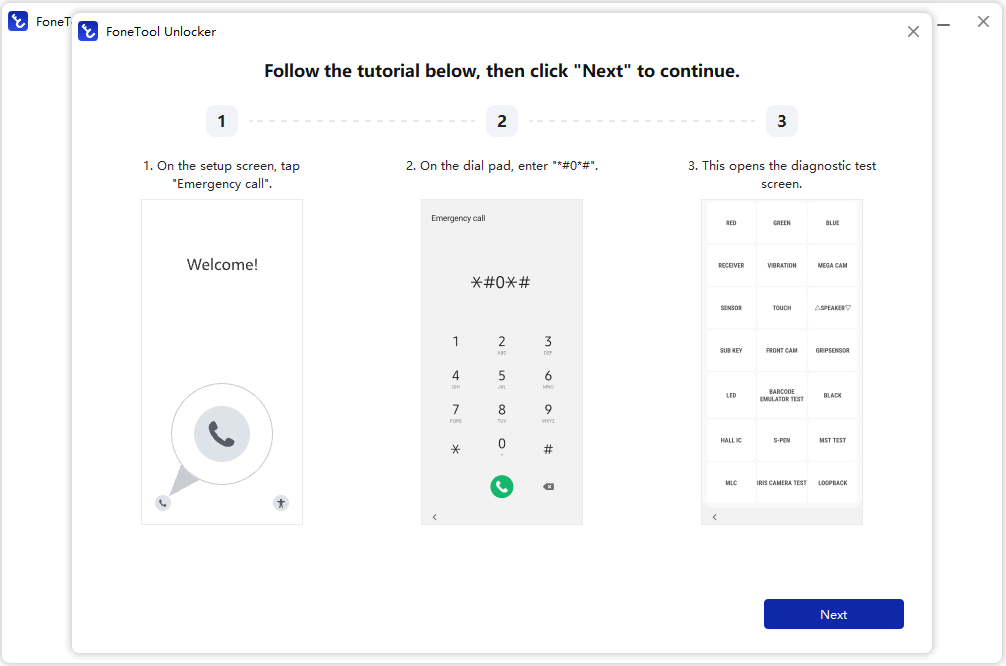
Step 3. Follow the on-screen prompts on the tablet - typically tap Emergency Call and enter a test-mode code such as *#0*# - then click Next in the software.
Step 4. Keep the USB cable connected and do not interrupt the process while the FRP lock is being removed.
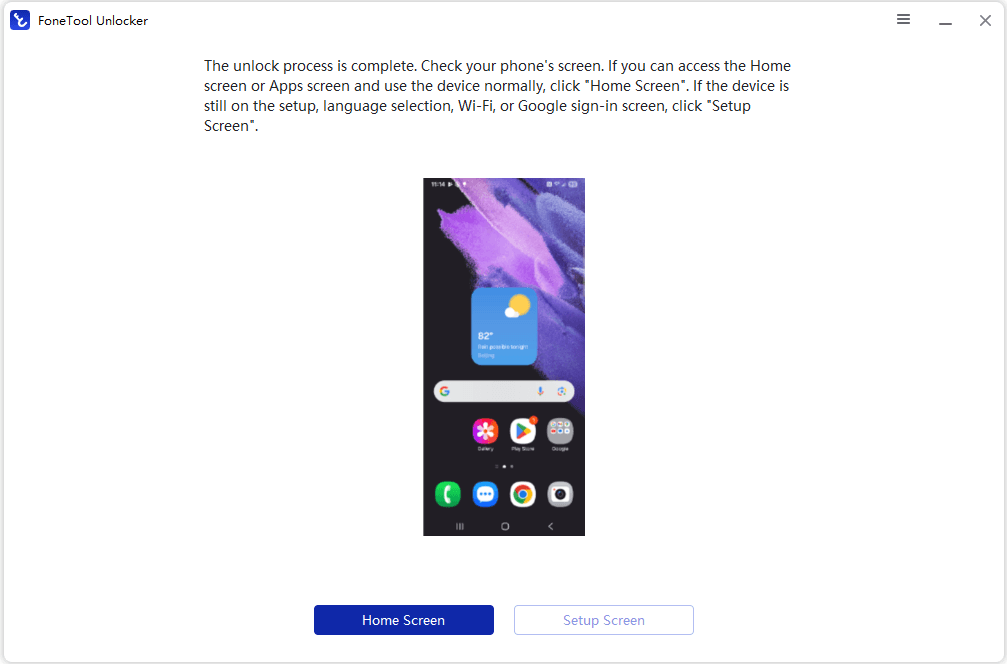
Step 5. When it finishes, choose Home Screen or Setup Screen depending on the tablet's state, complete the setup wizard, and sign in with your own Google account.
This tool canalso handle iPhone and iPad locking situations: screen passcode removal, Apple ID removal, iCloud Activation Lock bypass, Screen Time passcode, saved password management, and iTunes backup encryption removal. This is handy if your household has more than one locked device.
How to Bypass FRP Lock Before a Factory Reset
If your device still boots and you know its screen lock, it is simpler to bypass Google account on Samsung Tab E. This is because FRP is disabled when the Google account is removed from the device prior to the factory data reset.
Step 1. Open Settings on the Samsung Tab E.
Step 2. Tap Accounts and backup > Manage accounts.
Step 3. Select the Google account. Tap Remove account, then confirm it.
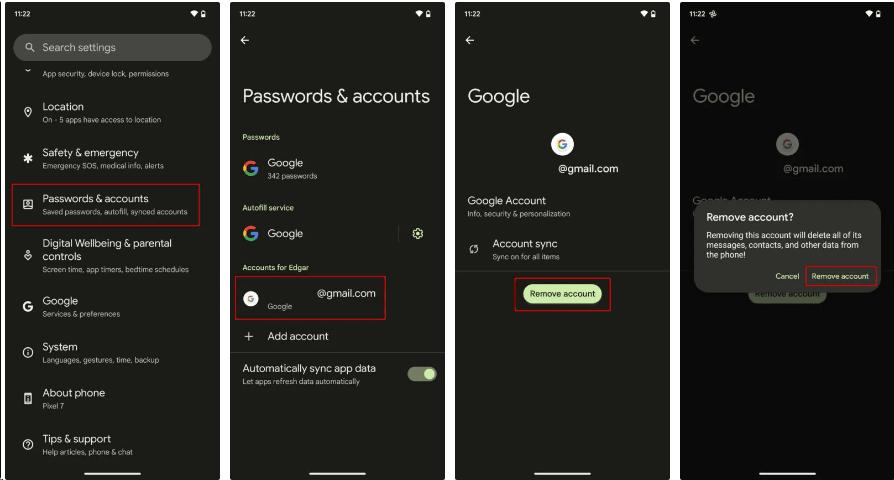
Step 4. Enter your pattern, PIN, or password if prompted to finish the Google account removal.
Now, you can reset through Settings, and your tablet will not trigger the FRP lock.
FAQs about Samsung Galaxy Tab E FRP Bypass
#1. Can I do Samsung Galaxy Tab E FRP bypass without a PC?
Technically, sometimes. Videos describe keypad tricks, TalkBack workarounds, and browser exploits for older tablets; some worked on early Android builds, and the Tab E runs dated software, so one may still function on your exact patch level. In practice, they're long, finicky, and break after any system update - most people spend hours and stay locked out. Thus, a PC Samsung Galaxy Tab E FRP bypass tool is far more predictable.
#2. Does Samsung Galaxy Tab E FRP bypass remove the lock?
Yes. It removes the requirement to enter the previous Google account during setup, so the tablet stops asking for credentials it will never accept. Because the tablet has already been factory reset, no personal data survives the process either way.
#3. Can Samsung Galaxy Tab E FRP bypass recover tablet access?
Yes. You get past the verification screen, complete setup, and reach the home screen with full access to apps and settings. It does not recover data. Anything already wiped by the reset is gone; the bypass only removes the lock. For files, you'd need a Samsung Cloud or Google backup made before the reset.
In the End
This guide explains what Google account lock (FRP) is, when it will trigger, and how to deal with it in two situations. If you're already locked out at the verification screen, FoneTool Unlocker can bypass Google account verification on PC over USB without the previous owner's credentials. If you still have access to the tablet, removing the Google account before resetting through Settings prevents FRP from ever activating. Choose the method that best suits your own situation!
FoneTool Unlocker - 1-Click Phone Unlock Software
Easily remove passcodes and restrictions from iPhone, iPad, iPod touch, and Samsung devices.
-
 iOS 27 Compatible
 iPhone 18 Supported
-
Samsung FRP Removal
100% Secure

Jona is an expert in mobile data backup and transfer, phone unlocking, and resolving iPhone issues. She maintains a sharp insight into the latest technology trends, ensuring that the information she provides stays current with industry developments.
Read author info >>



 as a preferred
source on Google
as a preferred
source on Google